DJ Music mixer - DJ Mix Studio
- 4.6
- Rating
- 50.00M
- Installs
- Free
- Price
 Analysis by App-foxy
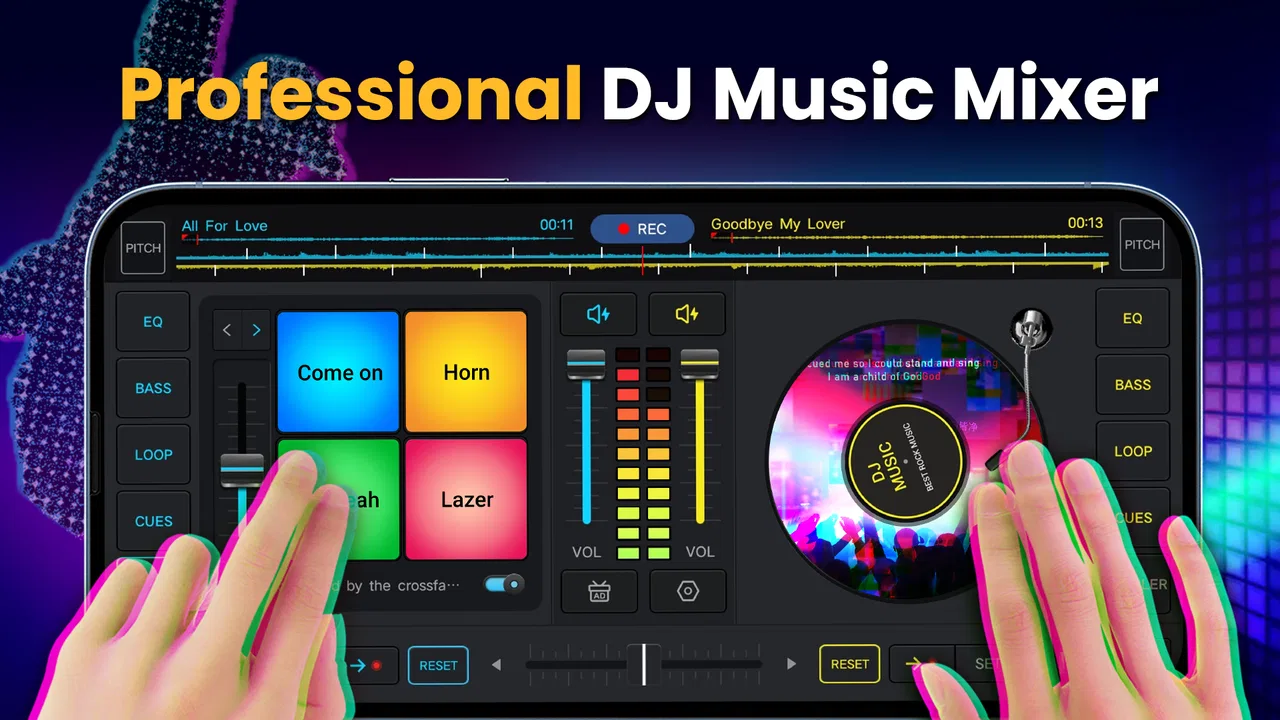
I spent time with DJ Music mixer - DJ Mix Studio as a casual music-making tool, and my first impression was clear: it is aimed at people who want to experiment with mixes without turning the process into a full studio project. It belongs to the Music & Audio category, comes from Easyelife, and focuses on combining songs, shaping beats, and recording a mix from a mobile device. That makes it more approachable than a traditional desktop production setup, although it also means experienced producers may notice its limits fairly quickly.
The app is free to install and is rated for Everyone, so the basic decision is easy: you can try the experience without paying upfront. Optional in-app purchases range from $1.99 to $9.99 per item, which matters if you plan to use it regularly and want to explore everything offered inside the app. I would not treat those purchases as necessary before testing your own workflow. The free starting point is the strongest part of its value proposition, because you can find out whether touch-based mixing suits you before spending anything.
How the mobile DJ experience feels in everyday use
I find the everyday appeal of this kind of mobile mixing less about building a flawless set and more about noticing how songs interact when I give them a deliberate transition. A useful next step is to choose one small goal before opening the app—such as testing a handoff between two tracks—so the session stays focused and the recording tells you something concrete. That approach also makes it easier to decide whether phone-based mixing suits you better than a larger production tool.
You May Also Like

 Blood Strike: 2.5 Anniversary
Blood Strike’s Loadouts Turn Every Drop Into a Tactical Gamble
A close look at Blood Strike’s custom loadouts: how fast access to signature weapons reshapes its battle royale rhythm, rewards preparation, and narrows the gap between fights.

 Pandora - Music & Podcasts
Pandora’s Music Is Easy to Start, but Harder to Recover
Pandora’s strength is its low-effort path from a seed to a station. Its weak spot is how much confidence it asks you to place in connection, setup, and quiet recovery.

 8 Ball Pool
 Is Built on Rivalries, Rematches, and Routine
A close look at the rivalries, rematches, shared routines, and unanswered safety questions that turn a quick pool match into a persistent mobile community.

 Samsung Music
’s Quiet Strength Is Playing What You Already Own
Its reach comes less from spectacle than from dependable access to a personal library. That simplicity is both the app’s strongest retention engine and its ceiling.

 AccuWeather: Weather Radar
AccuWeather Review: A Quick, Clear Forecast for Everyday Decisions
For everyday plans, the best forecast is the one you can understand quickly. AccuWeather makes rain timing, radar, and local conditions easy to act on, with a few trade-offs.

 Hill Climb Racing
Why Hill Climb Racing Still Turns Crashes Into One More Run
A tiny car, a bumpy hill and one more upgrade: Hill Climb Racing keeps resurfacing because its simple chaos makes every near-miss feel personal.
More From Our News Desk
View All News


A simple starting point for first mixes
What I like most is the low barrier between opening the app and trying an idea. A beginner does not need to understand a complicated production vocabulary before making a first attempt. The central appeal is hands-on experimentation: choose music, work with the mix, add a beat-oriented feel, and record the result. That sequence makes sense for someone who has never used a DJ application and simply wants to hear what happens when tracks are blended.
I found the phone format especially useful for short sessions. Instead of sitting down with the intention of finishing a polished release, I could approach it as a musical sketchpad. A few minutes are enough to test whether two songs work together or to build a rough transition idea. This is a different purpose from a serious digital audio workstation, where the user may spend much longer arranging individual parts, editing recordings, and managing a detailed project.
The app’s strongest audience is therefore not necessarily a club DJ or an electronic music producer. It is the curious listener, the beginner learning the basic feel of mixing, or the person who wants to make a quick personal remix on a phone. If you enjoy trying musical combinations but do not want to study a large desktop interface first, the compact approach is appealing.
Recording makes experiments more useful
The recording side gives the app a practical purpose beyond simply moving controls around. A temporary mix can become something you save and replay, which helps you notice problems that are easy to miss while performing. I recommend recording short sections rather than attempting a long session immediately. Listening back makes it easier to identify abrupt changes, uneven timing, or moments where one song overwhelms the other.
That workflow also works well for sharing ideas privately. For example, I can imagine a user preparing a rough soundtrack for a small gathering, making a personal workout mix, or sending a playful remix concept to a friend. The important point is to treat the recording as a draft unless the result has been carefully checked. A phone-based mixer is convenient for capturing an idea, but convenience should not be confused with professional mastering.
One useful habit is to make separate attempts with different energy levels instead of constantly modifying one long recording. A short, controlled experiment tells you more about the app’s handling of a transition than an extended session filled with changes. It also reduces frustration if a mix goes off course, because you can start again without losing a large amount of work.
Where the touch interface helps and where it gets in the way
Touch controls are naturally inviting. Tapping and dragging feels more immediate than learning a keyboard-heavy production program, and that immediacy suits quick musical play. I can see why the app has attracted a broad audience: its reach has passed 50 million installs, and its average rating is 4.4 from around 58 thousand ratings. Those figures suggest that the basic idea connects with many mobile users, although popularity alone does not guarantee that it will match your preferred style of mixing.
The trade-off is precision. Fingers cover more of a small screen than a mouse pointer, and a phone does not provide the same physical separation as dedicated DJ hardware. Fine adjustments can feel less controlled, particularly when you are trying to change several elements in quick succession. Beginners may find this forgiving because they are not expected to operate a large console, while advanced users may feel that the interface slows down more exact work.
I would approach the app with headphones when possible. That is not because the app requires a special setup, but because headphones make it easier to notice balance problems and timing changes. Phone speakers can hide details and encourage you to approve a mix that sounds less coherent elsewhere. A quiet room also helps, especially when comparing a recorded result with the original music.
What the free entry point really means
The free price is a genuine advantage for trying the app, but it should be read carefully. Free access gives you a chance to judge the core experience without committing money at the start. The presence of optional purchases means that some users may eventually want to pay for additional value, depending on how they use the app. Since the purchase range is $1.99 to $9.99 per item, I would make that decision only after identifying a specific limitation in your own sessions.
In other words, I would not install this expecting a completely cost-free substitute for every feature found in a professional music workstation. I would install it to test whether quick mobile mixing is enjoyable and useful. If the free experience already covers your occasional experiments, there is no reason to buy something simply because it is available. If you use the app often and a paid item directly improves the kind of sessions you actually make, the smaller purchase may be easier to justify than paying for a larger production platform you rarely open.
This distinction is important for value. The app offers convenience at no initial cost, while paid value depends on your personal workflow. A person who only wants to make an occasional remix may get enough from free access. Someone planning frequent recording sessions should first spend time learning what is included, then decide whether an optional purchase solves a real problem rather than adding features they will not use.
Three practical ways to get more from it
My first tip is to begin with songs that have clearly different sections. A track with an obvious intro, verse, chorus, or beat pattern gives you a more understandable place to attempt a transition. Starting with two dense songs can make the result confusing, and you may blame the app for a musical mismatch that comes from the source material. Choose simplicity before chasing a dramatic remix.
My second tip is to record a short test before building the full mix. This is a small step, but it prevents wasted time. Listen to the recording away from the controls and ask whether the change feels intentional. If it does not, adjust one thing at a time. Changing several controls together may produce a more exciting moment, but it also makes it difficult to understand which adjustment helped or caused the problem.
My third tip is to use the app as a preparation tool rather than assuming it must be the final production environment. You can explore an arrangement on the phone, capture the idea, and then decide whether it is worth developing elsewhere. That makes the app valuable even when it is not sufficient for a finished release. It turns the phone into a place for testing musical direction, not necessarily the last stage of the process.
A fourth useful approach is to keep your sessions purposefully narrow. Decide whether you are testing a transition, making a beat-focused sketch, or recording a complete short mix. Mixing all three goals at once can make the interface feel more limited than it really is. A focused task lets you judge the app fairly and gives you a clearer result to evaluate.
How it compares with familiar alternatives
Compared with a full digital audio workstation, this app is easier to approach but less suited to detailed production. A workstation normally makes more room for editing, arranging, and precise control, while a mobile DJ mixer emphasizes immediacy. If you already create finished tracks with complex layers, you may prefer the alternative that gives you deeper editing and a more spacious interface.
Compared with physical DJ equipment, the app is much cheaper to try and far easier to carry. It can be useful for learning the basic idea of blending music or for sketching a set away from home. It cannot provide the same tactile separation as dedicated decks, and users who care about fast, confident live manipulation may eventually prefer hardware. The app is best viewed as an accessible starting point or a portable practice companion.
Compared with a basic music player, it offers a more active role. You are not only listening; you are testing combinations and shaping a recording. That extra involvement is the reason to install it. If you mainly want reliable playback with minimal interaction, a normal player is likely a better fit. If you want to participate in the mix, this app has a clearer purpose.
Who is likely to get real value?
I would recommend trying it to a beginner who wants a friendly introduction to DJ-style experimentation. It is also a sensible option for casual creators who need a quick way to sketch a remix while travelling, during a break, or before deciding whether an idea deserves more work. The Everyone age rating makes it approachable for a broad audience, though younger users should still use sensible judgment around music sources and sharing recordings.
It may also suit someone who enjoys making themed personal mixes. A user could experiment with a mood for a workout, a relaxed evening, or a small social event, then record the most successful attempt. The value here is not only the final audio. The process encourages listening closely, noticing structure, and learning why some songs sit together more naturally than others.
I would be more cautious about recommending it to an experienced producer who expects detailed control, or to a working DJ who needs dependable performance tools for a serious live set. The phone form factor and simplified approach are advantages for accessibility, but those same qualities can become restrictions when accuracy, speed, and extensive arrangement options matter most.
Device support and practical expectations
The current version is 2.6.0, and the app supports devices running Android 6.0 or later. That gives it a broad compatibility range, including older Android phones that cannot run some newer music tools. Still, compatibility does not guarantee an identical experience on every device. Screen size, touch response, audio hardware, and general performance can all affect how comfortable mixing feels.
Before planning an important recording, I would test the app on the exact phone you intend to use. Check how comfortably you can reach the controls, whether playback feels responsive, and whether your headphones provide a clear enough reference. This is especially important on a smaller display, where a layout that feels manageable on one phone may feel cramped on another.
I would also avoid treating the first successful mix as proof that every future session will be equally easy. Different songs place different demands on the workflow, and a combination that sounds balanced in one attempt may require more careful handling in another. The best results come from patience, short tests, and listening back rather than relying only on what seems exciting while you are performing.
My buying recommendation
After using it, I see DJ Music mixer - DJ Mix Studio as a free-to-start creative playground with a clear audience. Its main benefit is that it lets ordinary phone users move from listening to experimenting without first buying equipment or learning a complex studio application. The ability to record a mix gives those experiments a concrete result, and the broad install base shows that the format has strong general appeal.
My recommendation is to install it if you want casual remixing, quick beat-based ideas, or a low-risk introduction to mobile DJ tools. Start with free access, use headphones, record short tests, and judge the app by the kind of music you actually want to make. Consider an optional purchase only when you know exactly what extra value you need; the available items cost between $1.99 and $9.99, so the sensible choice depends on frequency of use rather than curiosity alone.
I would skip it if your priority is professional-level arrangement, exact live control, or a replacement for dedicated hardware and a full workstation. In those situations, a more advanced alternative will likely save time despite being harder to learn. For everyone else, especially beginners and casual creators, this is an easy app to try and a useful way to discover whether making mixes on a phone is something you genuinely enjoy.
My final view is positive but measured: Easyelife has made the first step into DJ-style music creation approachable, and the free entry point keeps the risk low. It is not a complete studio, and it should not be judged as one. Used for short experiments, recorded drafts, and personal mixes, it delivers its best value without demanding a large commitment. Try it for the workflow, not for promises of professional production.
FAQs for DJ Music mixer - DJ Mix Studio
01What features does DJ Music Mixer - DJ Mix Studio offer?
DJ Music Mixer - DJ Mix Studio offers a range of features, including a user-friendly interface, a vast library of sound effects, crossfade capability, and customizable loops. It also supports multiple audio formats and provides real-time mixing capabilities. Users can create professional-quality mixes with ease, thanks to its intuitive design.
02Is DJ Music Mixer - DJ Mix Studio suitable for beginners?
Yes, DJ Music Mixer - DJ Mix Studio is designed to cater to both beginners and experienced DJs. Its intuitive interface and easy-to-navigate controls make it accessible for newcomers, while offering advanced features for seasoned users to explore and utilize in their mixing projects.
03What are the system requirements for DJ Music Mixer - DJ Mix Studio?
For Android, the app requires a device running Android 5.0 or higher. For iOS, it requires iOS 11.0 or later. The app is optimized for both smartphones and tablets, providing a seamless experience across different devices. Ensure your device has sufficient storage space for additional sound files.
04Does DJ Music Mixer - DJ Mix Studio support external equipment?
Yes, DJ Music Mixer - DJ Mix Studio supports external DJ controllers and other compatible equipment, allowing users to enhance their mixing experience. Check the app's compatibility list to ensure your hardware is supported. This feature is particularly beneficial for live performances and professional use.
05Are there any in-app purchases in DJ Music Mixer - DJ Mix Studio?
While DJ Music Mixer - DJ Mix Studio is free to download, it offers in-app purchases that unlock additional features and sound packs. These purchases can enhance your mixing capabilities and provide a wider array of tools, making it worthwhile for those looking to expand their creative options.
Pros
- Intuitive interface for beginners.
- Wide range of sound effects.
- Real-time audio mixing.
- Supports various audio formats.
- Customizable playlists.
Cons
- Ads can be intrusive.
- Limited free features.
- Occasional crashes reported.
- High CPU usage on older devices.
- No offline mode available.

DJ Music mixer - DJ Mix Studio
Gallery